
Download 3D Sharks – Free Mac Screen Saver, Underwater Predator Animation
Overview
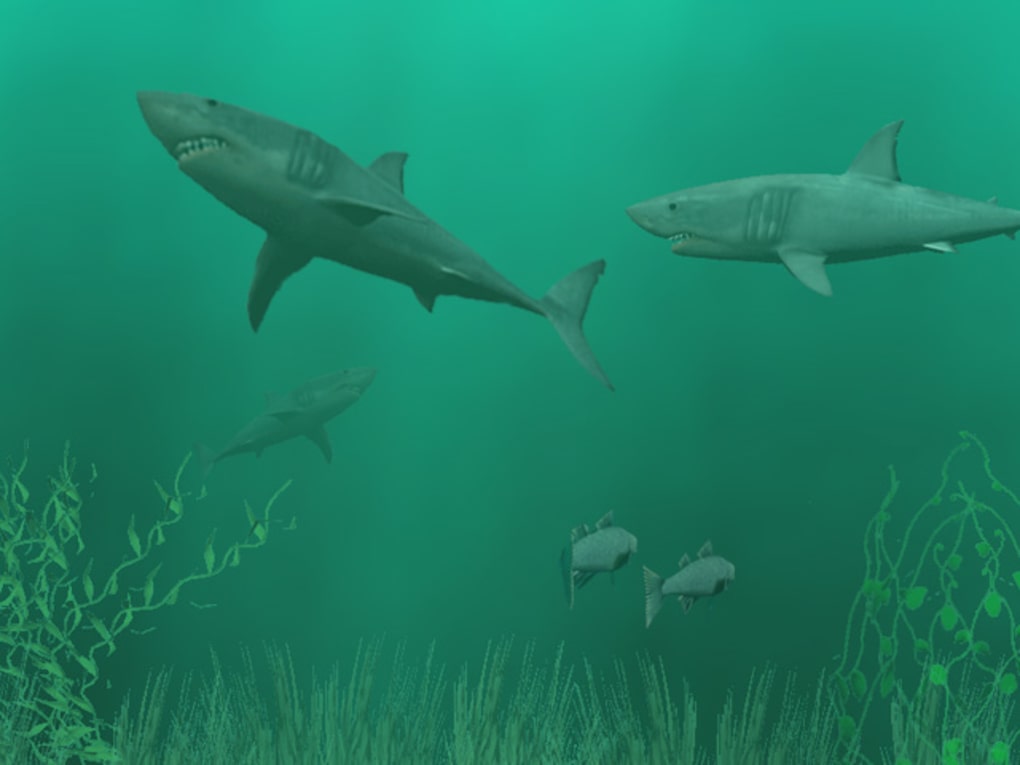
3D Sharks is a captivating screen‑saver designed exclusively for macOS. First introduced to the Mac community in 2006, this trial‑version software brings a realistic ocean scene to your desktop, where sleek, animated sharks glide across a three‑dimensional underwater landscape. The program is lightweight, occupying less space than the average Mac customization tool, and it runs on both Mac OS X and earlier versions of the operating system. While the trial version is free to download, it offers a taste of the full experience, allowing users to evaluate the visual quality, performance impact, and overall aesthetic before deciding on a purchase. Because it’s a screen saver, 3D Sharks runs only when your Mac is idle, making it an energy‑efficient way to personalize your workspace without interfering with everyday tasks.
The 2.6 release, last updated on 10 November 2006, still holds appeal for users who appreciate classic Mac utilities. Although the download count has slowed—recording zero new downloads last week—the software remains a nostalgic favorite for those who enjoy marine-themed visual effects. The interface is simple: a single preference pane lets you adjust animation speed, shark density, and background music (if desired). Its English language support ensures that the setup process is straightforward for a global audience.
In the following sections we’ll explore the key features that set 3D Sharks apart, walk through the installation and usage steps, detail compatibility requirements, and present an unbiased list of pros and cons. A handy FAQ at the end will answer common questions about licensing, performance, and customization options. Whether you’re a long‑time Mac enthusiast looking for a fresh screen saver or a newcomer curious about 3D visual effects, this review provides the information you need to decide if 3D Sharks is the right addition to your Mac.
Key Features & Benefits
- Realistic 3‑D Shark Animation: High‑resolution models of great white, tiger, and hammerhead sharks move fluidly through a dynamic underwater environment.
- Customizable Depth & Speed: Users can adjust how close the sharks appear and control the animation speed to match their preferences or system capabilities.
- Ambient Ocean Soundtrack: Optional background music adds a calming, immersive feel, with volume controls that sync to your Mac’s system settings.
- Low System Footprint: Optimized rendering ensures the screen saver consumes minimal RAM and CPU, keeping your Mac responsive while idle.
- Multiple Display Support: Works seamlessly across dual‑monitor setups, extending the ocean scene across both screens for a panoramic effect.
- Easy Preference Panel: A single, intuitive control window lets you toggle shark count, change lighting, and switch between day/night cycles.
- Trial Version with Upgrade Path: The free trial provides full feature access for a limited time, after which you can purchase a license to unlock the permanent version.
Beyond visual flair, 3D Sharks serves as a practical tool for Mac users who want a dynamic yet unobtrusive screen saver. The animation pauses automatically when you move the mouse or press a key, instantly returning you to your work without any lag. The software’s modest resource usage means you can leave it running even on older Mac models without noticeable slowdown. Additionally, the modular design allows developers to add new marine life or environmental effects in future updates, though the last official update was in 2006. For those who enjoy personalizing their desktop, 3D Sharks offers a distinct, thematic alternative to generic screensaver collections.
Installation, Usage & Compatibility
Step‑by‑Step Installation
- Visit the official download page and click the Download 3D Sharks button. The file is provided as a compressed
.dmgpackage. - Once the download completes, double‑click the
.dmgfile to mount the installer volume. - Drag the
3D Sharks.appicon into yourApplicationsfolder. macOS may prompt you to confirm the action; click Copy to proceed. - Open
System Preferences→Desktop & Screen Saver→Screen Savertab. Locate “3D Sharks” in the left‑hand list and select it. - Click the Screen Saver Options… button to configure shark density, animation speed, and audio preferences.
- Close the preferences pane. Your new screen saver is now ready; it will activate after the idle time you set in the “Energy Saver” preferences.
How to Use the Features
After activation, the screen saver displays a serene ocean backdrop with sharks swimming in realistic patterns. Use the Options panel to:
- Adjust Shark Count: Choose between 5, 10, or 20 sharks, depending on how crowded you want the scene.
- Change Speed: Select “Slow,” “Medium,” or “Fast” to control the pace of the animation.
- Toggle Sound: Enable or disable the ambient soundtrack; you can also set the volume to match your system level.
- Day/Night Cycle: Switch between a bright midday ocean and a twilight setting for varied visual moods.
Compatibility & System Requirements
3D Sharks is compatible with macOS versions ranging from Mac OS X 10.2 (Jaguar) up to macOS 10.15 (Catalina). The software runs on both Intel‑based Macs and Apple Silicon machines via Rosetta 2 translation, though performance is optimal on newer hardware. Minimum specifications include:
- Processor: 1 GHz Intel Core Duo or later
- Memory: 512 MB RAM (recommended 1 GB)
- Graphics: OpenGL‑compatible GPU with at least 64 MB VRAM
- Disk Space: 20 MB free storage for the application and temporary cache files
Because the screen saver runs only when the system is idle, it does not interfere with active applications. Users with multiple monitors will see the same ocean scene extended across all displays, preserving the immersive experience.
Pros, Cons & Frequently Asked Questions
Pros
- Visually stunning 3‑D animation that adds personality to any Mac.
- Lightweight and low‑impact on system resources.
- Highly customizable settings for shark count, speed, and audio.
- Supports dual‑monitor configurations.
- Free trial provides full feature access before purchase.
Cons
- Last official update was in 2006; no recent bug fixes or new content.
- Only available for macOS; no Windows, Android, or iOS version.
- Trial version may display occasional watermarks after extended use.
- Lacks built‑in sharing options for screenshots or video clips.
- Limited language support – currently English only.
FAQ
Is 3D Sharks free or paid?
The software offers a free trial version that includes all features for a limited period. To continue using it after the trial expires, you must purchase a license for the full version.
Will 3D Sharks slow down my Mac?
No. 3D Sharks is optimized for low CPU and RAM usage, especially because it runs only when the system is idle. Even older Macs can display the animation smoothly without noticeable performance loss.
Can I use 3D Sharks on multiple monitors?
Yes. The screen saver automatically extends the ocean scene across all connected displays, creating a seamless panoramic view.
Is there an option to disable the sound?
Absolutely. Within the Screen Saver Options panel you can toggle the ambient ocean soundtrack on or off, and adjust the volume independently of the system sound.
Will future macOS updates affect compatibility?
Because the last update was in 2006, there is a risk that major macOS changes (especially those that drop 32‑bit support) could cause issues. However, the current version runs well on macOS up to Catalina using Rosetta 2 on Apple Silicon.
Conclusion & Call to Action
3D Sharks delivers a compelling blend of visual appeal and system efficiency, making it a standout choice for macOS users who want to personalize their idle desktop with a marine theme. While the software has not received updates in many years, its lightweight design and customizable options ensure it still functions admirably on modern Macs. The free trial lets you experience the full range of features before committing to a purchase, and the straightforward installation process means you’ll be swimming with sharks in minutes.
If you value a screen saver that’s both eye‑catching and unobtrusive, 3D Sharks is worth a download. Click the button below to get the trial version, explore the underwater world, and decide if you’d like to upgrade to the full license for an uninterrupted ocean adventure.







